
[en]It is easy to set up Persona in LibreOffice 4.
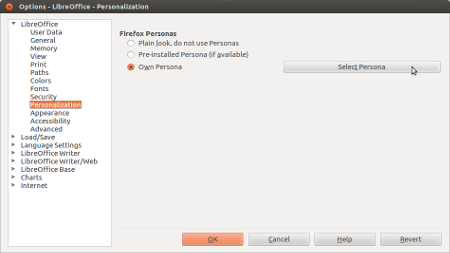
Go to Tools > Options… > LibreOffice > Personalization
Click on Select Persona button
Click on Visit Firefox Personas button
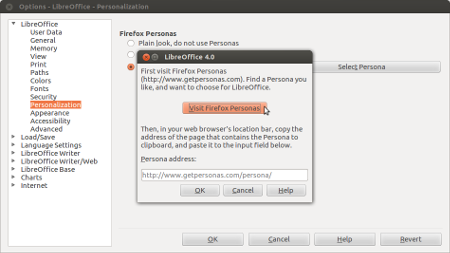
You will be directed to redirected to Firefox Persona website. Find the persona you want, and then copy and paste the link to the LibreOffice Persona windows.

Click OK, now you can enjoy Persona in the LibreOffice.
Tested on:
- Ubuntu 12.04.2 LTS
- LibreOffice 4.0.1.2 [/en]
[id]Untuk memasang Persona di LibreOffice 4 sangat mudah sebenarnya.
Silakan tuju ke Tools > Option… > LibreOffice > Personalization
Klik tombol Select Persona
Klik tombol Visit Firefox Personas
Anda akan diarahkan ke website Firefox Persona. Silakan cari dan pilih Persona yang Anda inginkan, kemudian salin dan tempelkan alamat link Persona tadi di jendela Persona LibreOffice.
Klik OK, sekarang Persona sudah terpampang di LibreOffice.
Dicoba di:
- Ubuntu 12.04.2 LTS
- LibreOffice 4.0.1.2 [/id]
=======<0>=======
Jika tulisan saya berguna untuk Anda, bolehlah sedikit saweran untuk menyemangati saya berkarya.
 This work is licensed under a Creative Commons Attribution-NonCommercial-ShareAlike 4.0 International License.